
Product design & B2B commerce
2021–2023KIDCITY
- Retailer app UX/UI
- Figma components
- Prototypes & handoff
I redesigned wholesale buying around sets, city minimums and separate city orders, with clear next steps from discovery to payment.
- Launched retailer app
- iOS + Android
- Independent checkout
- City by city
- Retailer feedback
- Clearer next steps

At a glance
- Challenge
- Make set-based wholesale buying and different city minimums understandable in one retailer app.
- Pivotal decision
- Treat each city as an independent order, allowing an eligible city to check out while the others remain in the cart.
- Outcome
- Retailer app launched on iOS and Android, with clearer city checkout reported through Kidcity’s channel partners.
- My role
- Product Designer, B2B Commerce: retailer experience, components, prototypes and handoff.
- Duration
- March 2021–January 2023.
- Team / collaborators
- Developers, project manager, marketing team and company leadership.
The challenge
One cart.
Different city rules.
The defining challenge: a retailer could be ready to order from one city while still below the minimum in another. I made each city’s status and next action visible.
01 / Understand the buying model
A cart with more than
one set of rules.
KIDCITY connects kidswear retailers with manufacturers and wholesale collections. Retailers buy predefined sets containing multiple pieces and sizes. Different sourcing cities can have different order minimums and tax rules.
The existing app made discovery, minimum quantities and multi-city checkout difficult to follow. I worked with the developers, project manager, marketing team and company leadership to understand those rules before redesigning the retailer experience.
Start with how retailers source.
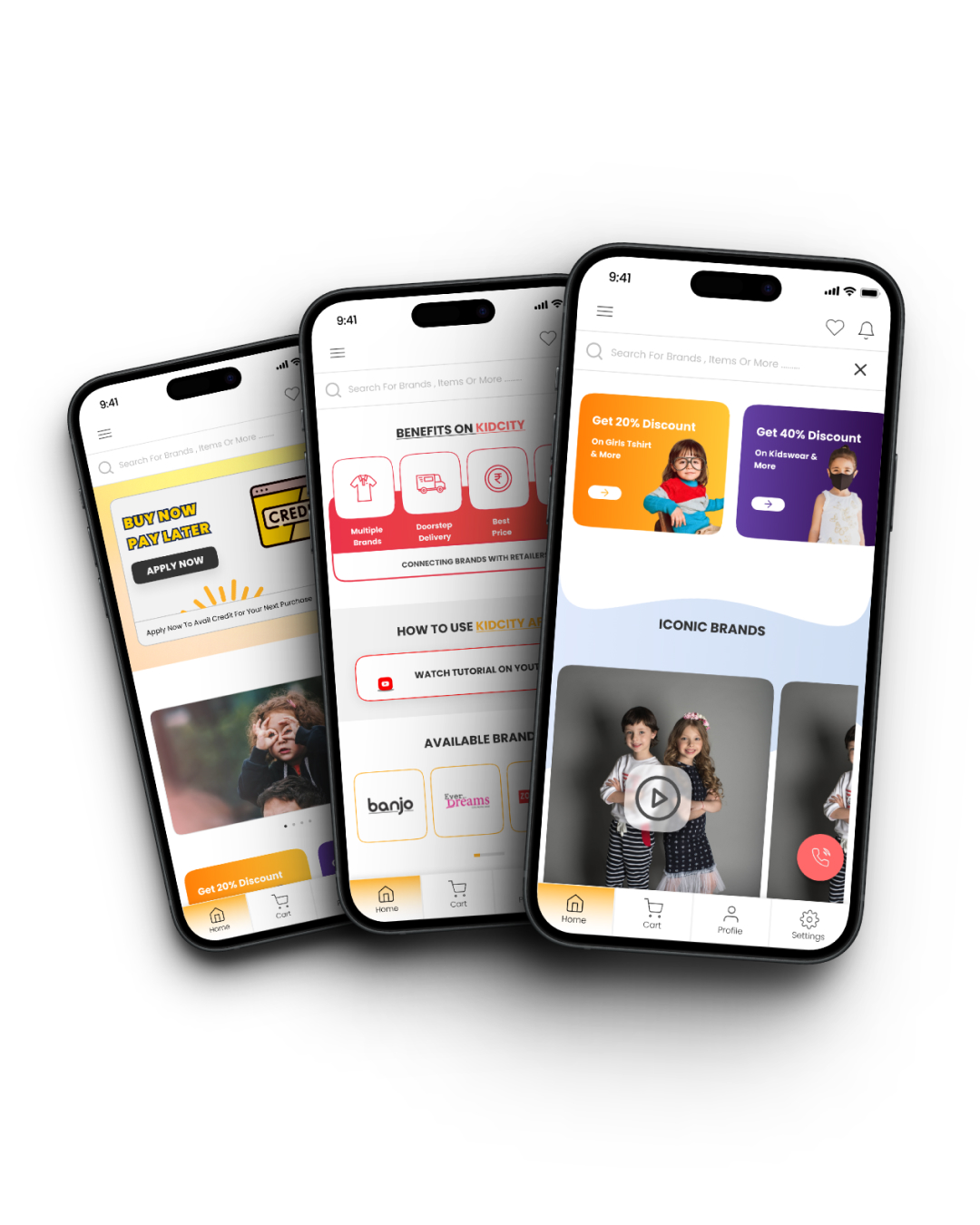
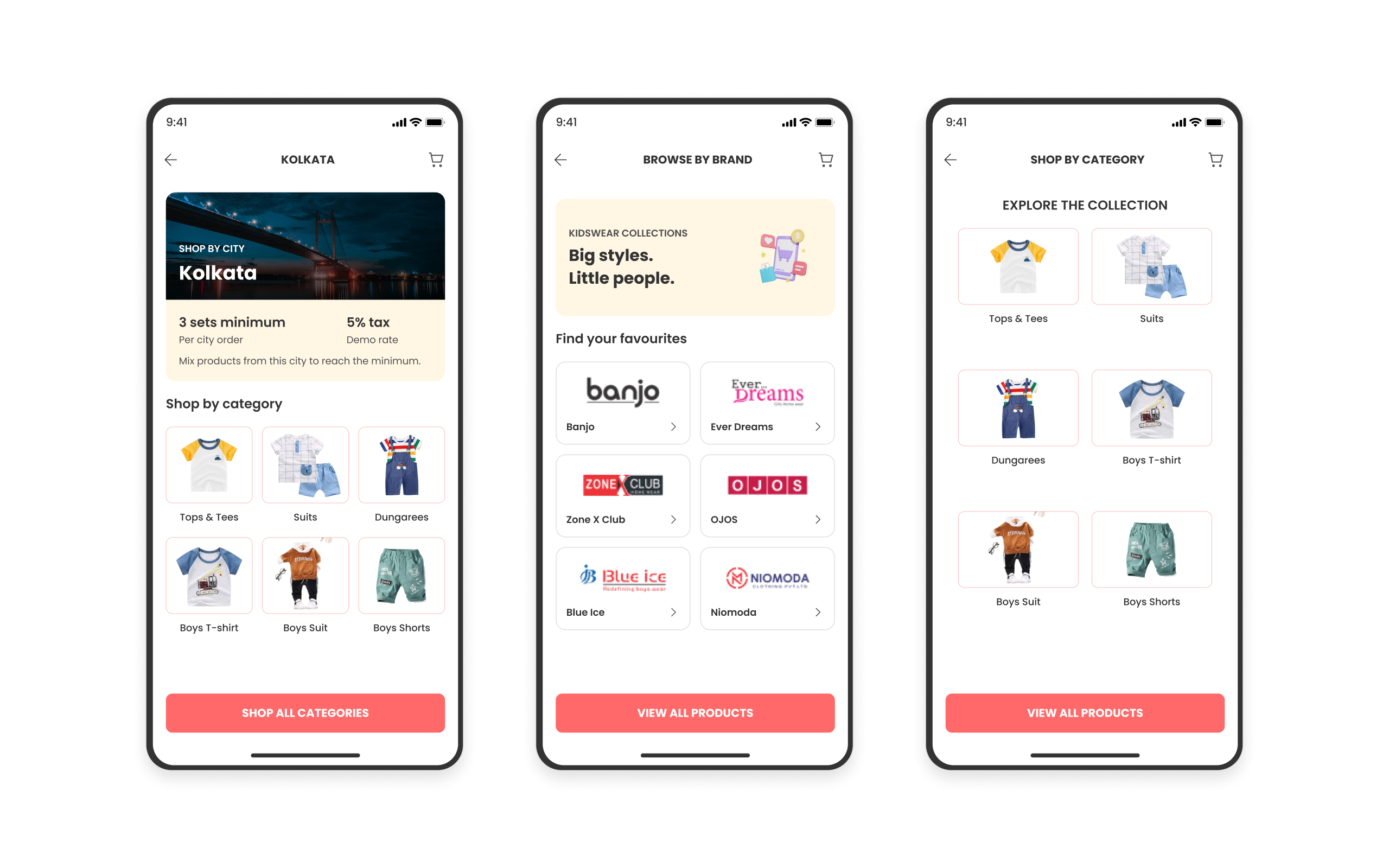
I reorganised discovery around city, brand and category. The homepage brought these routes together with campaigns, offers and platform benefits, giving retailers several ways into the catalogue.
Home, Cart, Profile and Settings remained easy to reach throughout the journey.
Discovery / From account to product
- 01
Enter
Create an account or log in
- 02
Choose a route
Browse by city, brand or category
- 03
Compare
Explore the product listing
- 04
Review
Open the product’s wholesale details
02 / Make the buying unit clear
Choose sets.
Understand every piece.
A quantity of one did not mean one item. A set could contain six pieces across several sizes. Retailers needed to understand the contents, price per piece, complete set price and minimum quantity before committing.
I brought those details together on the product and cart screens. A set quantity stepper updated the subtotal and minimum-order status, making the rule visible during selection.
Price per piece × pieces per set
= price per setPrice per set × sets selected
= item subtotal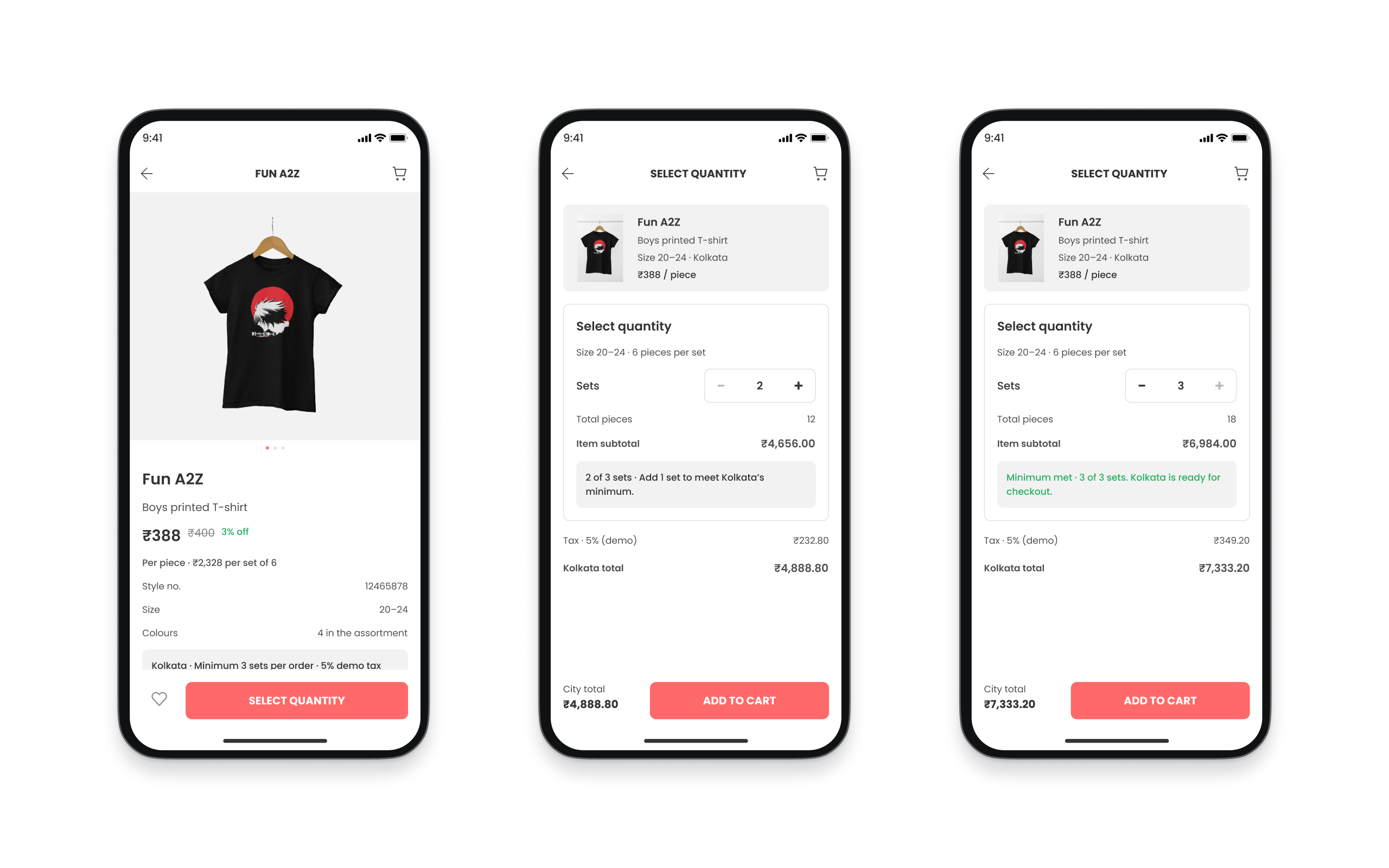
03 / The pivotal decision
Let each city move
at its own pace.
I grouped the cart into separate city orders. Each city card showed its sets and pieces, minimum requirement, order value and current status.
If one city was below its minimum, the message explained what to add. An eligible city could enter checkout while the other city’s products stayed in the cart.
- 01Needs attentionBelow the city minimum
Show how many more sets are needed.
- 02ReadyMinimum reached
Make the city eligible for checkout.
- 03SelectedChosen for checkout
Carry only this city’s details forward.
- 04PlacedOrder completed
Remove it from the remaining payable amount.
04 / Complete one city order
Keep checkout tied
to the selected city.
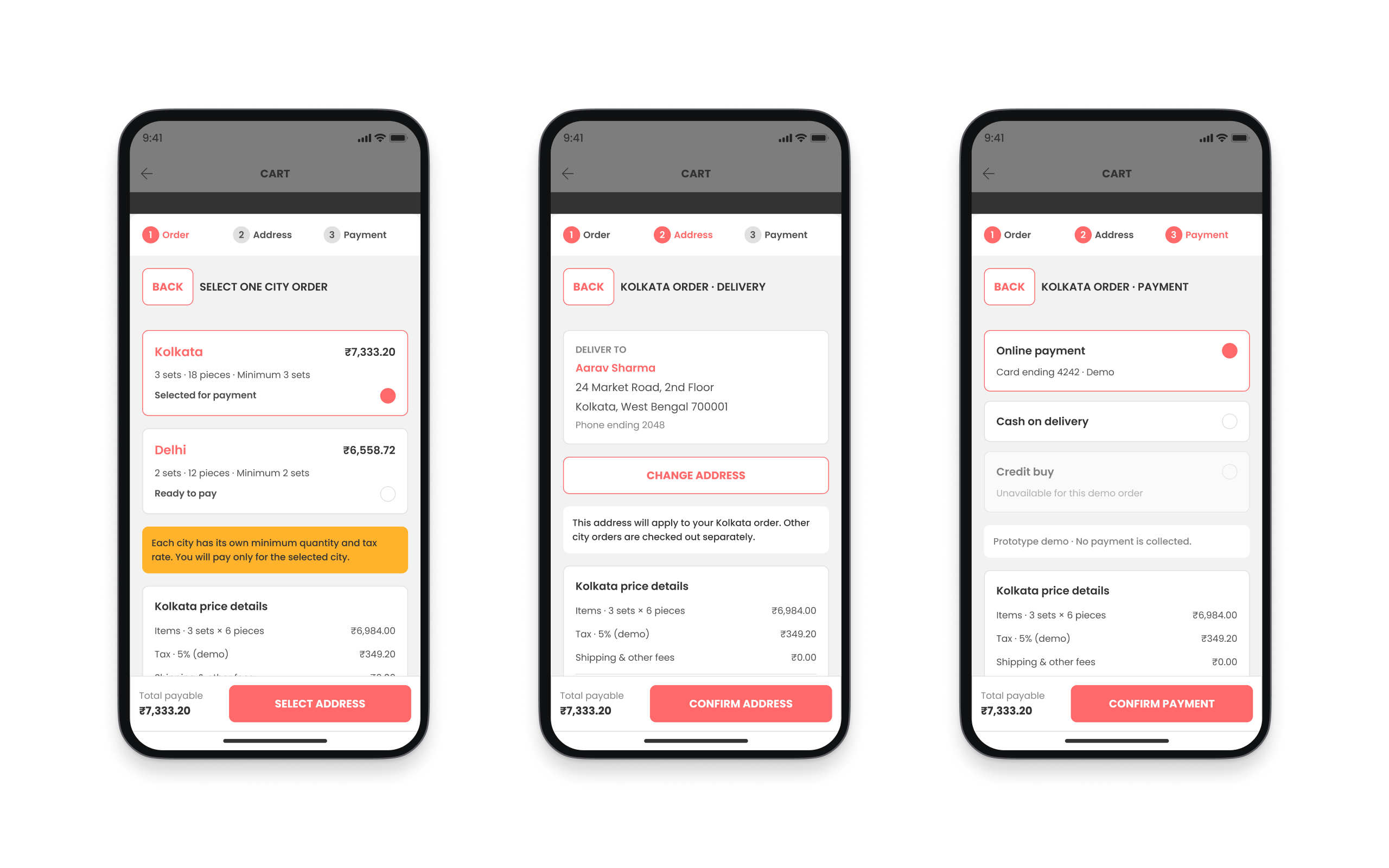
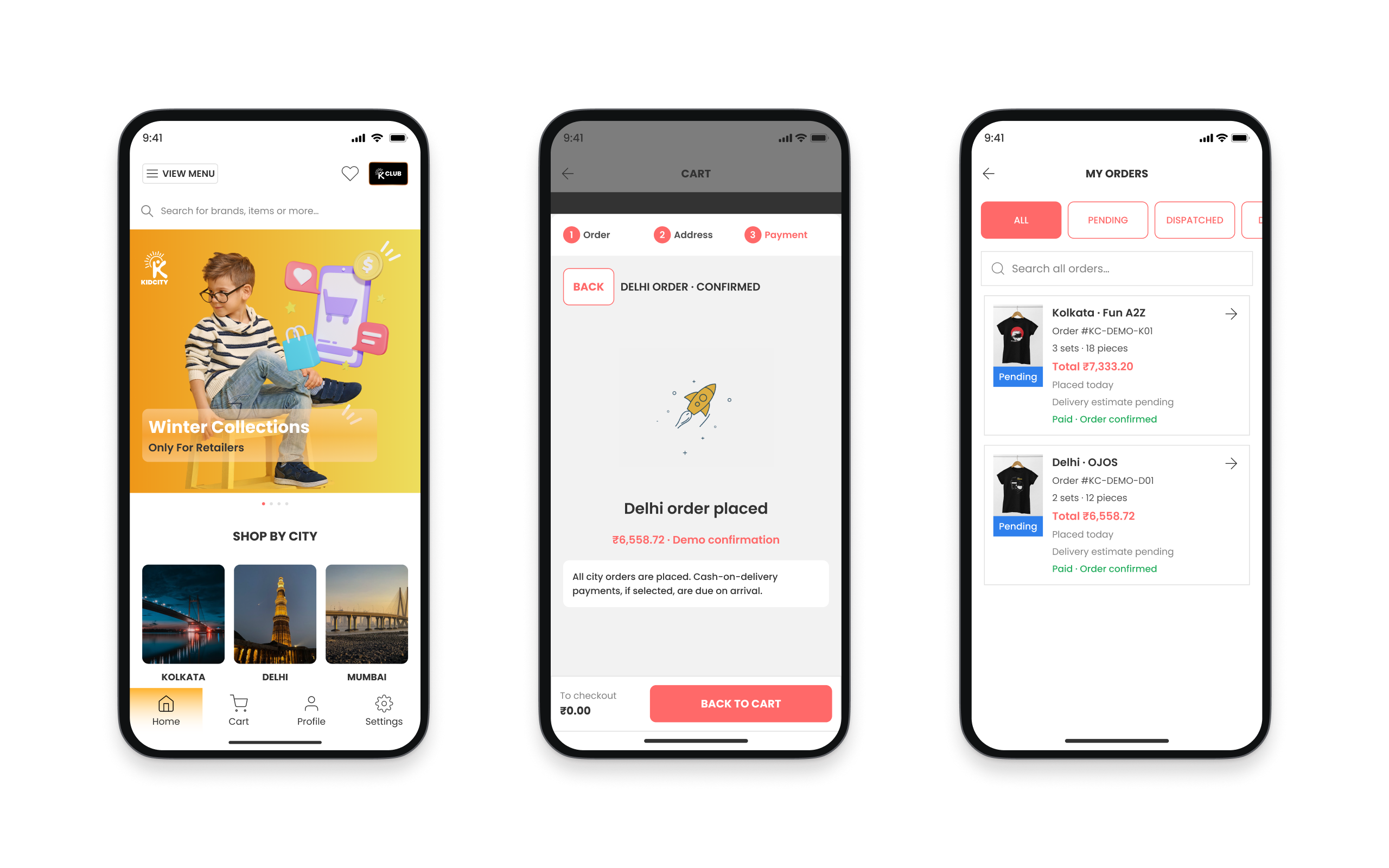
I organised checkout into three visible steps: Order, Address and Payment. Once the retailer selected an eligible city, the following screens carried only that city’s amount, delivery details and payment information.
The live app supported online payment, cash on delivery and credit purchase. After confirmation, the city was marked as placed and removed from the remaining payable amount.
Checkout / One city at a time
- 01
Order
Select one eligible city order
- 02
Address
Confirm its delivery address
- 03
Payment
Choose an available payment method
- 04
Confirmation
Mark this city order as placed
Another city remains
Return to the cart and complete the next city order separately.
Every city is placed
Show an empty cart with a direct route to My Orders.
05 / After confirmation
Separate delivery progress
from payment status.
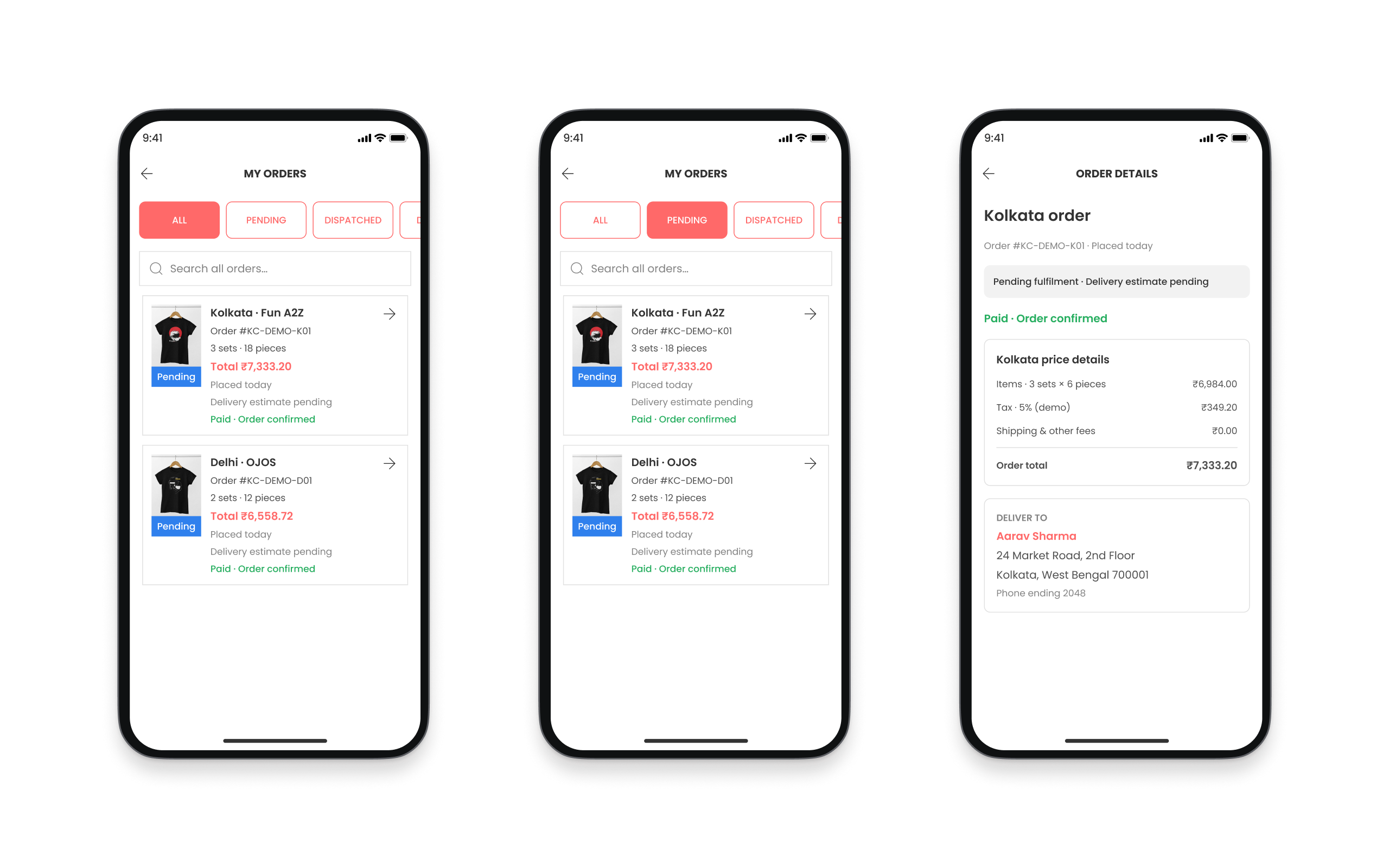
I designed My Orders with search and fulfilment filters. Each city had its own order record because payment, tax and delivery could differ.
The detail view separated order status from payment status, alongside products, quantities, city-specific prices, delivery address and order reference.
06 / Design, review & handoff
Reusable patterns.
From discovery to orders.
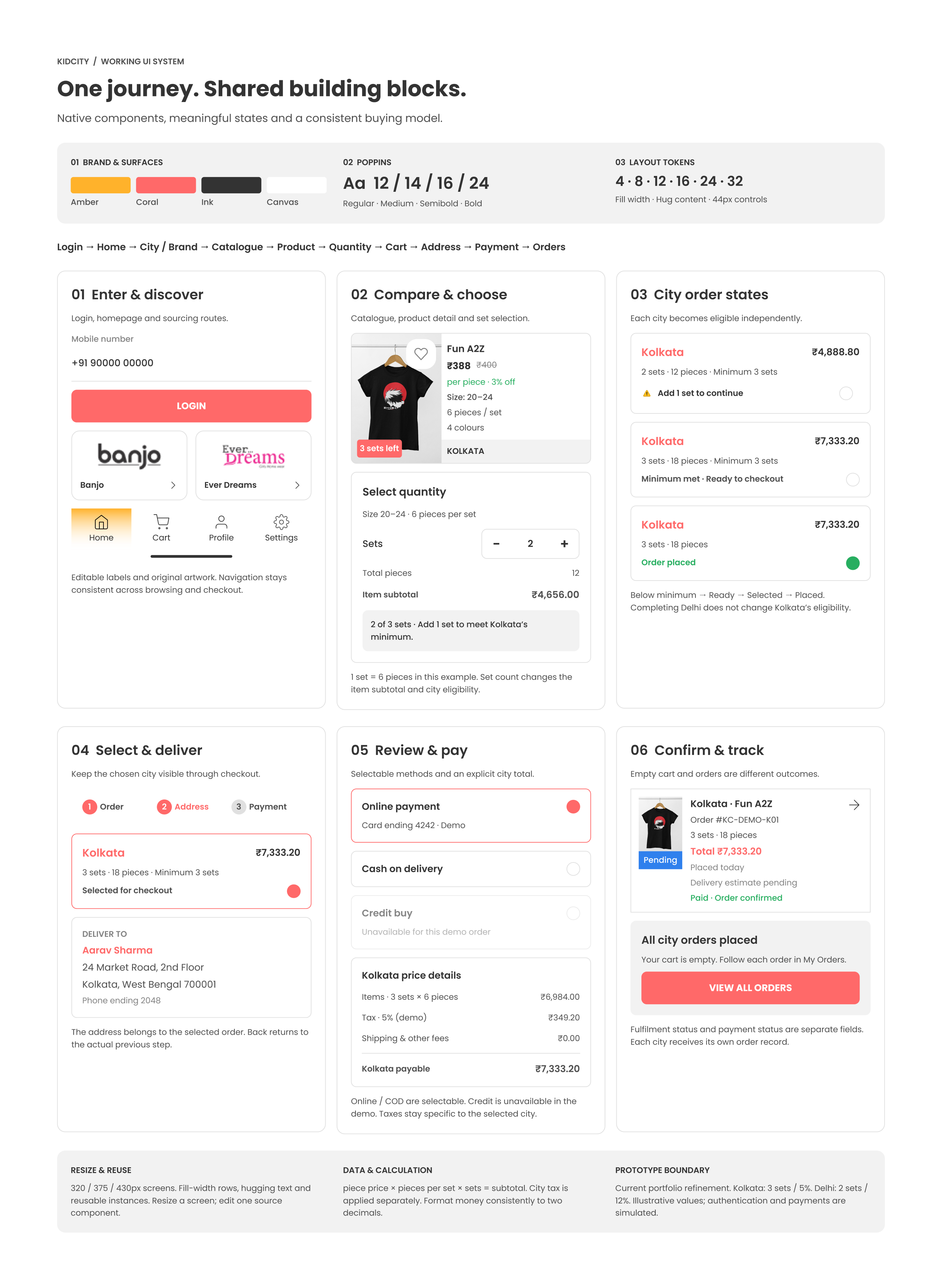
I extended KIDCITY’s existing colours, typography and identity into reusable Figma components: navigation, product and city cards, quantity controls, minimum messages, checkout progress, payment selectors and order states.
I connected the key journeys in interactive prototypes and worked with the internal team through review and handoff. Kidcity’s channel partners gathered retailer feedback in person, which the CEO and development team relayed to me. That feedback and developer reviews informed the iterations. I supplied the screen designs, components, flows and state logic for implementation.
Open the component guide at full size
Layout and reuse
The refined city and brand screens were checked at 320, 375 and 430px. Components use Auto Layout, fill-width rows and hugging text. A source-component padding change was verified in its screen instance.
States and eligibility
Each city moves through needs attention, ready, selected and placed. Quantity changes affect that city’s minimum. Paying one city leaves the other available in the cart.
Data for implementation
Piece price × pieces per set × sets gives the item subtotal. The selected city supplies its own minimum and tax rate. Order status and payment status stay separate.
Current prototype scope
This focused portfolio refinement uses illustrative values: Kolkata requires 3 sets with 5% tax; Delhi requires 2 sets with 12% tax. Authentication and payment are simulated.
07 / Reported outcomes
Launched across platforms.
Clearer checkout in use.
The redesigned retailer app launched on iOS and Android. After the clearer eligibility states and minimum-order messages were added, Kidcity’s channel partners reported fewer questions about city-order eligibility and clearer understanding of why each city required a separate checkout.
Channel partners also reported an increase in orders. The CEO and development team relayed these observations to me. These are qualitative reports, not a quantified measure of the redesign’s impact.
Launch platforms
- App StoreiOS
- Google PlayAndroid


Platform scale during the engagement
- Active retailers
- 5,000+
- Daily users
- 1,500+
These figures describe the platform I designed for, not growth attributed to the redesign.
Excerpt from recommendation · 4 May 2023
“He brings a holistic approach to design, considering the user journey, business goals, and technical feasibility…”
The takeaway
The key was understanding the wholesale rules behind the screen, then organising them into product, cart and checkout decisions retailers could follow and developers could build.